

A search result is two lines long. The first names the page, the second gives a reason to click, and between them they decide whether a ranking turns into a visit. Most sites write those two lines once, inside a CMS field with no preview, and never see them as a searcher does. A free title and meta description checker closes that gap: paste both, see the likely result, and get a plain warning when a length is off.
On this page
A Snippet Is a Pair, Not Two Separate Tags
The most common mistake is writing the description as a longer version of the title. The two have different jobs, and repeating one inside the other wastes the only space you get.
The title identifies. It names the page and the audience it serves, with the search phrase near the start so the words that matter survive truncation. The description persuades. It gives a concrete reason to click, which is a different sentence entirely from the one that names the page.
Two further rules follow from treating them as a pair. Each page needs its own pair, since duplicated titles across a site give a searcher nothing to choose between. And within a pair, the title and the description should say different things.
Checking the Pair Before You Publish
Free tool: see which AI crawlers can read your site, and which are blocked. Run the AI crawler check
Four fields, and nothing leaves your browser.
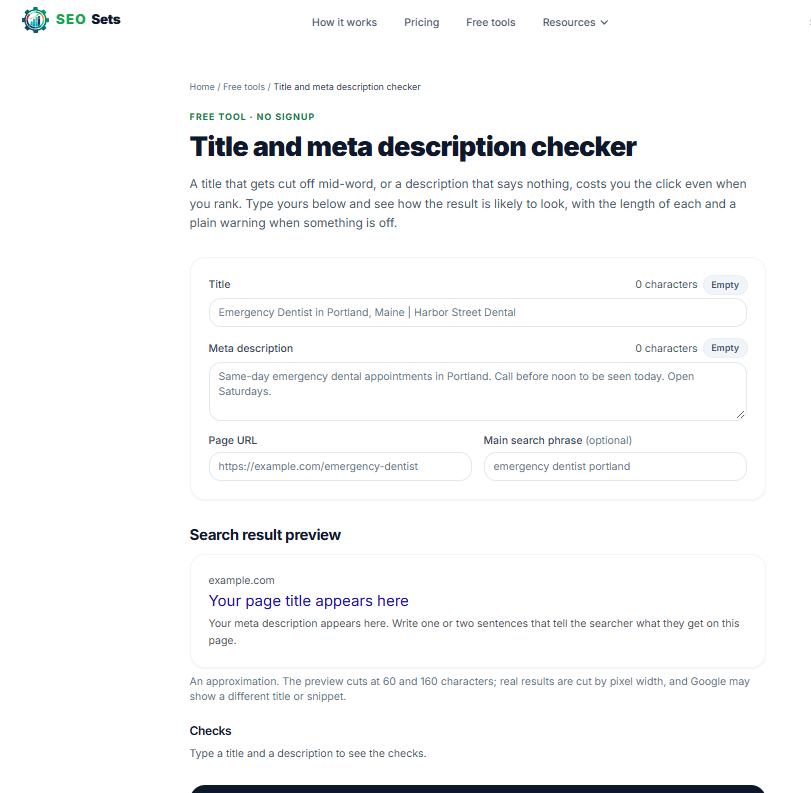
Title and meta description each carry a live character counter. The page URL populates the domain line in the preview. The main search phrase is optional and lets the tool check whether your target wording appears in either field.
Two details in the method note are worth knowing. Character counts collapse repeated spaces, so a double space between sentences does not inflate your count. And the tool runs entirely in the browser: it sends nothing to SEO Sets and does not fetch your page. You are checking text you typed, not a live URL, which makes it usable for drafts that are not published yet.
The preview below the fields is explicit about its own approximation. It cuts at 60 and 160 characters, while real results are cut by pixel width, and Google may show a different title or snippet entirely.
When a Length Flag Appears
Typing real content turns the counters into judgements.
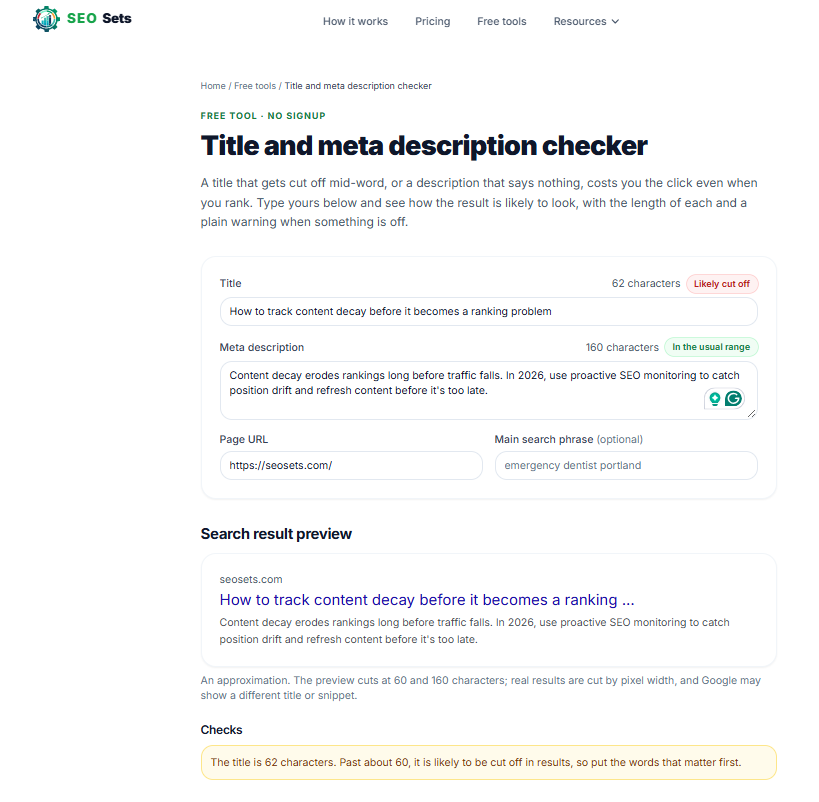
Here the title runs 62 characters and is flagged as likely to be cut off, while the description at 160 characters sits in the usual range. The preview confirms the first finding, with the title ending in an ellipsis before its final words.
The check message says what to do rather than simply what is wrong: past about 60 characters truncation becomes likely, so put the words that matter first. That is the correct instruction, because the fix is usually reordering rather than deleting. A long title still works when its first half carries the meaning and the brand name is what disappears.
Note also what the tool does not flag. When both fields sit in range, the message says nothing needs flagging at these lengths and then hands the judgement back to you: read the preview as a searcher would and decide whether the offer is clear. Length is the mechanical part of the problem. Whether the sentence earns a click is not something a character counter can answer.
| Title | Meta description | |
| Job | Names the page and who it is for | Gives a reason to click |
| Working range | About 50 to 60 characters | About 140 to 160 characters |
| Official limit | None | None |
| Ranking signal | Yes | No |
| What truncates it | Pixel width, so wide letters cut sooner | Pixel width, and mobile shows less than desktop |
| Common failure | Brand name first, subject last | Generic wording that answers nothing |
Neither field has an official limit. The ranges above are working ranges the checker uses, not rules, and the real cutoff depends on pixel width, which is why two titles of identical character length can truncate differently and why mobile and desktop disagree.
Why Your Text May Not Appear at All
This is the part that surprises people, and the reason a preview is an intention rather than a promise.
Google builds title links from several sources, including the title element and the main headings on the page, and it may display something other than what you wrote. For descriptions it goes further: it often generates the snippet from page content instead of using your meta description at all.
One practical lever follows from this. A title that matches the page’s main heading is less likely to be rewritten, which makes alignment between your H1 and your title tag a cheap way to keep your own wording in the result. If the two say noticeably different things, you have given Google a reason to choose between them.
Which Pages Are Worth Rewriting First
A better title only helps a page that already gets seen. Rewriting snippets on pages with no impressions changes nothing, which is why a site-wide title rewrite is usually poor use of a week.
The sequence that works is to find the pages already earning impressions, check their pairs, and fix the ones where the title is cut off or the description is missing. Connecting Search Console surfaces the pages with the most upside, and the title and meta description checker then handles the editing side for each one. The pairing matters: data tells you where to spend the effort, the checker tells you whether the new text will survive display.
Frequently Asked Questions
What is the ideal title length?
About 50 to 60 characters is a working range rather than a rule, since pixel width is what actually governs the cutoff.
How long should a meta description be?
Around 140 to 160 characters on desktop, and less on mobile, so front-load the reason to click.
Does the checker fetch my page?
No. It works only on the text you type, in your browser, which means nothing is sent anywhere and unpublished drafts can be checked safely.
The Practical Takeaway
Of everything in on-page work, the snippet pair is the shortest piece of writing with the largest effect on whether a ranking produces traffic. It takes two minutes per page, needs no developer, and the failure mode is invisible from a rankings report, since a page can hold position four for months while its title has been cut off the entire time.
Take the handful of pages that already earn impressions, check each pair, reorder any title that gets flagged, and write a real sentence wherever a description is missing. Every free tool on SEOsets.com runs without a signup, so pair this with a readiness score on the same pages and you will finish the session with one short list of fixes rather than a general intention to tidy your snippets.
Free, no signup
Is your site blocking the AI crawlers that cite you?
The free AI crawler check reads your robots.txt and requests your page as GPTBot, ClaudeBot, PerplexityBot and the other AI crawlers, so you can see who gets in and who gets blocked.
Run the free checkSee all free tools
Vinod Jethwani is the CEO of Walnut Solutions, a leading SEO company renowned for its data-driven strategies and customized solutions. With extensive expertise in digital marketing and a results-oriented approach, Vinod has helped businesses across diverse industries enhance their online presence and achieve sustainable growth. As a trusted advisor and innovator, he is committed to driving measurable success for his clients in the competitive digital landscape. How we measure