

Every AI answer starts with a fetch. Before ChatGPT can cite your page or Claude can quote your pricing, something has to request that URL and receive it. If the request is refused, nothing downstream matters: not your headings, not your schema, not the months you spent on content. An AI crawler checker tests that first step directly, by asking your server the same question the bots ask.
The awkward part is that most site owners have no idea whether those requests succeed. Server logs rarely get read, CDN rules get added by someone else, and robots.txt often carries lines copied from a blog post in 2023. A page can look perfect in a browser and still be invisible to every assistant your buyers use.
On this page
Two Separate Gates Stand Between a Bot and Your Page
Access failures happen in two different places, and confusing them wastes a lot of time.
The first gate is robots.txt. This is a stated preference, read before the request. A disallow line tells a well-behaved crawler to stay away, and the major AI companies say their bots honour it, with one important exception covered below.
The second gate is your server or CDN. This is enforcement, and it does not care what robots.txt says. Bot protection rules, rate limits, firewall settings and challenge pages can refuse a request that robots.txt explicitly permits. This is the failure mode nobody catches, because no file on your site records it. You allowed the bot, your infrastructure turned it away, and the only trace is a log entry you never opened.
A useful check has to test both gates. Reading robots.txt alone tells you what you intended, while sending a real request under each bot name tells you what actually happens. That is the job an AI Crawler Checker does in a single run, and it is why a clean robots.txt file is never proof of access on its own.
The Crawler Families Worth Knowing
Free tool: see which AI crawlers can read your site, and which are blocked. Run the AI crawler check
AI companies no longer run one bot each. They run three kinds, and blocking one does not block the others.
| Crawler type | Examples | What it affects |
| Training | GPTBot, ClaudeBot, CCBot | Whether your content may feed model training |
| Search indexing | OAI-SearchBot, Claude-SearchBot, PerplexityBot | Whether you appear in AI search answers |
| User-triggered fetch | ChatGPT-User, Claude-User, Perplexity-User | Whether a page loads when someone asks about it |
The split matters commercially. Blocking GPTBot keeps your content out of training datasets while leaving OAI-SearchBot free to include you in ChatGPT search results. Anthropic runs the same three-way split and states plainly that blocking Claude-SearchBot can reduce how often your site surfaces in search responses.
One wrinkle deserves attention. OpenAI’s documentation says robots.txt rules may not apply to ChatGPT-User, since those fetches are initiated by a person rather than by an automatic crawl. Anthropic takes the opposite position and says all three of its bots honour robots.txt, Claude-User included. Google-Extended is different again: it is a robots.txt control token rather than a real user agent, so there is nothing to send a request as, which is why a checker can only report its rule and not test it.
Running the Check on a Live URL
The check takes one input, a page URL rather than a bare domain, because robots.txt rules are path-specific and a rule that permits your homepage may block your blog.
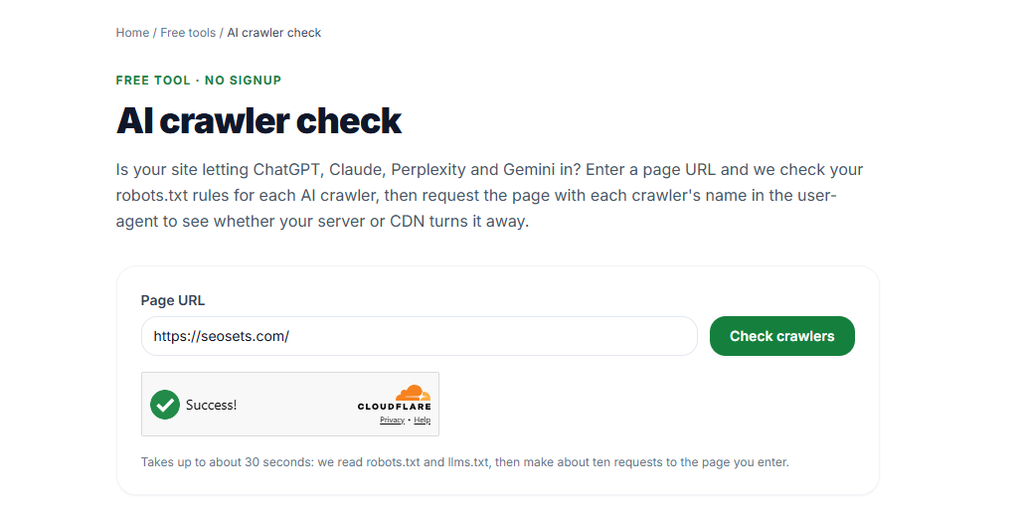
Behind that button, the tool reads robots.txt and llms.txt, then makes roughly ten live requests to the page you entered, each one carrying a different crawler name in the user-agent header. The whole run takes about thirty seconds. Repeating the same URL within an hour returns the cached result, which is handy when you are editing rules and want to compare runs. No account is needed to run a page.
The summary panel comes first and answers the only question that matters at a glance.
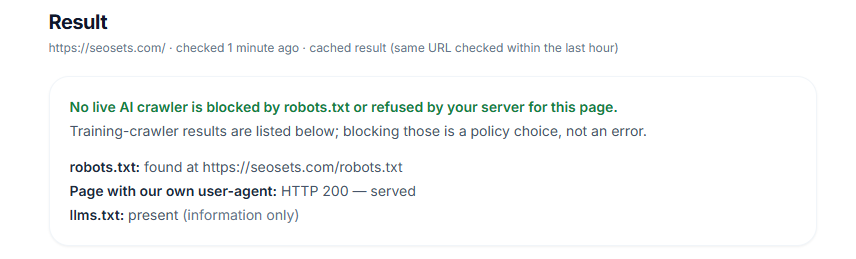
Here the verdict is clean: no live crawler blocked by robots.txt, none refused by the server, robots.txt found, the page served normally to the tool’s own user-agent, and llms.txt present. That last line is informational rather than a ranking factor, since llms.txt is a proposed convention rather than a standard any major assistant commits to following.
Notice the wording about training crawlers. Blocking GPTBot or CCBot is a policy decision many publishers make deliberately, so a good checker reports it without calling it a mistake.
Reading the Crawler Table Line by Line
The detail sits below the summary, one row per bot, with three columns that should be read together.
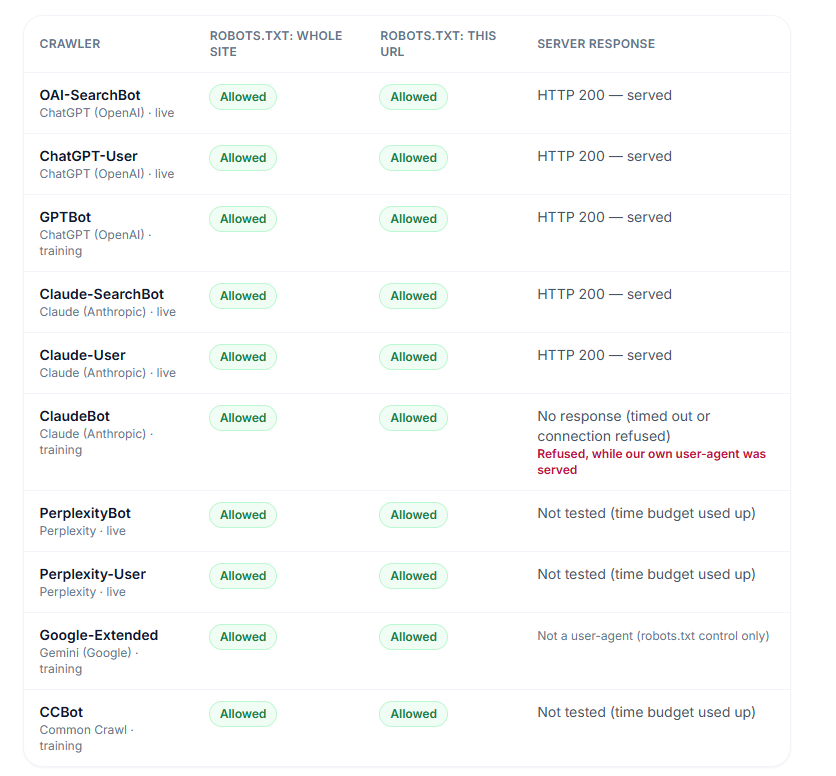
The two robots.txt columns separate site-wide rules from rules affecting the exact URL you tested. A site can allow everything globally and still block one directory, which is how blog sections quietly disappear from AI answers after a migration.
The server response column is the one to study. In this run, most bots received HTTP 200, and the page was served. ClaudeBot received no response at all, and the report flags the contradiction: refused, while the tool’s own user-agent was served fine. That pattern almost always points to bot protection at the CDN rather than anything in robots.txt, since the only variable that changed between the two requests was the name in the header.
Rows marked as not tested simply ran past the time budget. Rerun the check if you need those specific bots confirmed, and expect results to vary slightly between runs on busy servers.
When a Refusal Shows Up, Where to Look
Start at the edge. Managed bot protection, firewall rules targeting unfamiliar user agents, and aggressive rate limiting account for most refusals, and all three sit above your application where site owners rarely look.
Next, check for stale robots.txt lines. Blocks added during the first wave of AI crawler anxiety are still sitting in thousands of files, quietly excluding sites from search surfaces their owners now want to be in.
Finally, remember that each host is separate. A subdomain needs its own robots.txt, so a clean result on your main domain says nothing about your documentation or shop subdomain.
Common Questions
Does allowing AI crawlers mean my content gets used for training?
Only if you allow the training bots. Search and fetch bots are separate user agents and can be allowed independently.
How soon do robots.txt changes take effect?
Fetch behaviour updates quickly, while search inclusion can take around a day to reflect a change.
Is a blocked training crawler a problem?
No. It is a choice about licensing and control, and plenty of publishers make it deliberately while keeping search crawlers open.
Final Thoughts
Content strategy assumes access, and access is the one thing almost nobody verifies. Two gates decide it: robots.txt and your own infrastructure, and only one of them is visible in a text file. A thirty-second check tells you which bots reach your pages today and which are being turned away without your knowledge.
Tools like SEOsets.com can help you evaluate website accessibility and identify potential issues affecting search visibility. Run your most valuable page through a crawler check this week, note any bot that was refused while your own browser loads the page normally, and take that one row to whoever manages your CDN. Fixing a single firewall rule can restore access for every assistant at once, which is a rare thing in this work.
Free, no signup
Is your site blocking the AI crawlers that cite you?
The free AI crawler check reads your robots.txt and requests your page as GPTBot, ClaudeBot, PerplexityBot and the other AI crawlers, so you can see who gets in and who gets blocked.
Run the free checkSee all free tools
Vinod Jethwani is the CEO of Walnut Solutions, a leading SEO company renowned for its data-driven strategies and customized solutions. With extensive expertise in digital marketing and a results-oriented approach, Vinod has helped businesses across diverse industries enhance their online presence and achieve sustainable growth. As a trusted advisor and innovator, he is committed to driving measurable success for his clients in the competitive digital landscape. How we measure