

Writing an llms.txt by hand is a small, annoying job. The format is simple markdown, but it has a specific shape that nobody remembers because most people write one file and never touch it again. An llms.txt generator removes the memory problem: you describe your site, list the pages that matter, and it produces a correctly structured file you can copy or download.
Before the how, a note on expectations. llms.txt is a proposed convention rather than a ratified standard, and no major AI provider has publicly committed to reading it the way search engines commit to reading robots.txt. Treating it as a ranking lever would be a mistake. Treating it as a cheap, well-formed summary of what your site contains, placed where a machine can find it, is reasonable.
On this page
What the File Does, and What It Does Not
The thinking behind llms.txt is straightforward. HTML pages are noisy. Navigation, cookie banners, scripts and layout markup surround a few hundred words of actual content, and a model working with a limited context window spends much of it on material that carries no meaning. A single markdown file listing your important pages, with a sentence of context each, is a far more efficient starting point.
What it does not do is grant access, override robots.txt, or influence rankings. It also does not replace your pages, since the entries are links rather than content. A reader following the file still has to fetch what it points at, which is why crawler access and page readiness remain the first two problems to solve.
Anatomy of a Working File
Free tool: see which AI crawlers can read your site, and which are blocked. Run the AI crawler check
The generator’s form mirrors the file’s structure, which makes it a reasonable way to learn the format even if you intend to hand-write future versions.
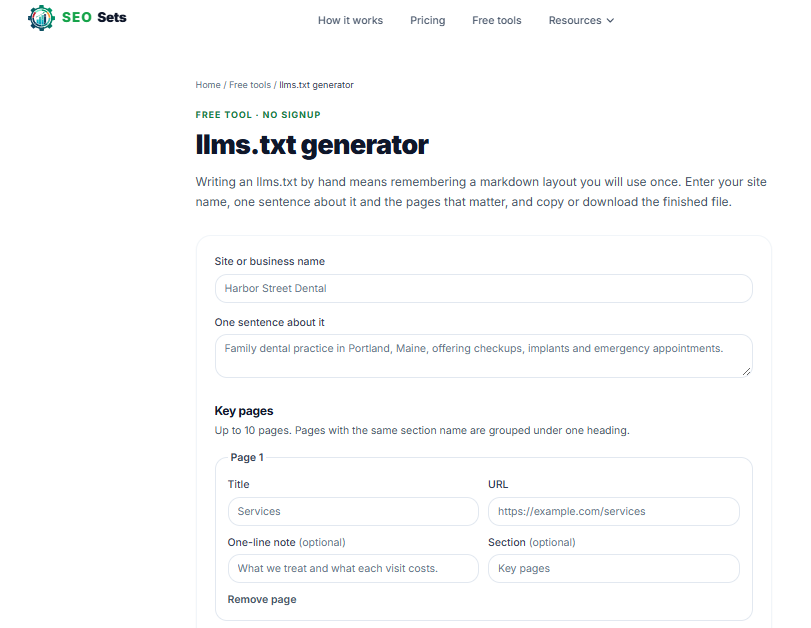
Three inputs produce the whole file. The site or business name becomes the H1, the single sentence becomes a blockquote summary directly beneath it, and each key page becomes a linked list item. Up to ten pages are allowed, which is a sensible constraint rather than a limitation, since the value of the file comes from being selective.
Two optional fields per page deserve attention. The one-line note is where context lives, and it is the difference between a bare link and a useful entry. A line such as what you treat and what each visit costs tells a reader what the page answers before they fetch it. The section field controls grouping: pages sharing a section name are collected under one heading, so a site can separate services from documentation or company information without editing markdown by hand.
| Form field | What it produces | Practical guidance |
| Site or business name | The H1 at the top of the file | Use the name people search for, not a legal entity name |
| One sentence about it | A blockquote summary under the H1 | State what you do and who for, in one plain sentence |
| Page title | The link text | Describe the page, not the brand |
| Page URL | The link target | Absolute URLs, matching your canonical versions |
| One-line note | Text after the link | Say what question the page answers |
| Section | An H2 grouping heading | Group by purpose, leave blank to use the default |
Filling It In for a Real Site
Seeing the fields completed with real content makes the intent clearer than any specification.
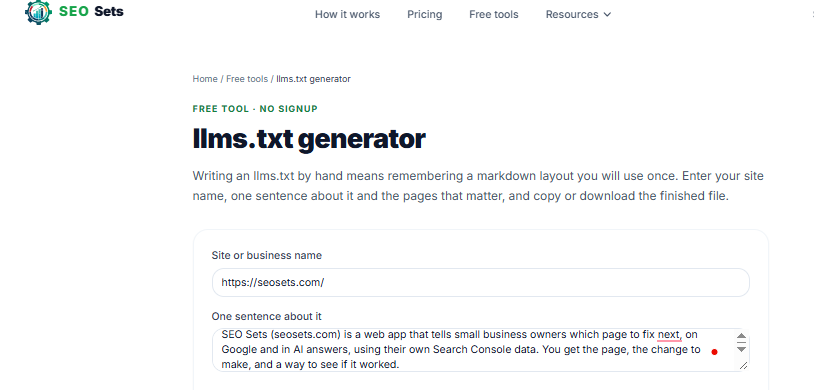
The summary sentence is doing most of the work here. It names the product, states what it does, identifies who it serves, and says what the user gets. Compare that with the version most sites would write, which usually describes a mission rather than a function. For this purpose, specific beats aspirational every time, because a model summarising your site will reuse the framing you supply.
Keep the sentence to one sentence. The format expects a blockquote, not a paragraph, and a reader skimming for orientation benefits from compression. Save the detail for the per-page notes, where it is attached to something concrete. The llms.txt generator enforces the shape, so the only real work is deciding what to say.
The Output, and Where It Belongs
The generated file appears in full, ready to copy or download.
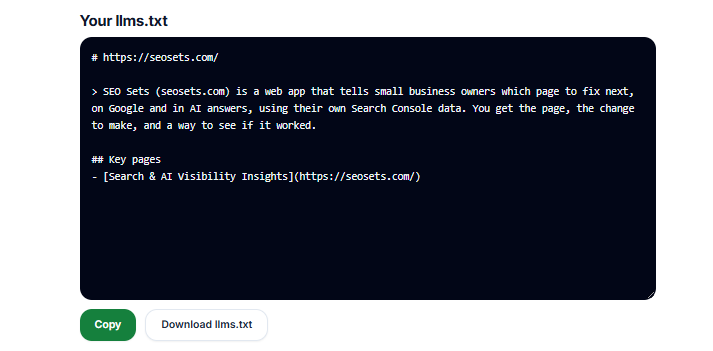
Reading the markdown confirms the structure: an H1 for the site, a blockquote for the summary, an H2 for each section, and a bulleted list of links with notes. The file is plain text, so it can be edited in any editor afterwards without breaking anything.
Placement matters more than people expect. The file belongs at the root of your domain, served at /llms.txt as plain text rather than as a download. Scope follows the same rule as robots.txt: one file per host, so a documentation or shop subdomain needs its own. If your main site and your help centre live on different hosts, one file cannot describe both.
Choosing the Ten Pages
This is the part the tool cannot do for you, and the part that determines whether the file is worth having.
Start with the pages that answer questions rather than the pages that get traffic. A pricing page, a page explaining what a service includes, a page covering a common problem in your field: these are what an assistant needs when someone asks about you. A high-traffic blog post that ranks for a loosely related term usually is not.
Include the practical pages people need to act. Contact details, service areas, hours and booking pages are frequently what a user actually wanted when they asked an assistant about a local business.
Avoid duplicating one topic across several entries. Ten slots across ten distinct subjects covers more ground than ten variations on your main service, and overlap forces a reader to guess which entry is authoritative.
Finally, write each note as if the link were absent. If a reader learned nothing from the entry without clicking, the note is decoration.
Keeping It Current
A stale file is worse than none, because it misrepresents the site with apparent authority. Two habits prevent that.
Review the file whenever a listed URL changes, since a broken link in a curated list of ten is a quarter of the file’s value gone. And revisit the page selection after any significant content launch, because the pages worth pointing at move as a site matures.
Regenerating takes a minute, which is short enough to make a quarterly review realistic rather than aspirational.
FAQ
Do AI assistants actually read llms.txt?
Support is not confirmed by the major providers. Publishing the file is a low cost bet rather than a guaranteed channel, which is why it should come after crawler access and page structure rather than before them.
Is it a replacement for a sitemap?
No. A sitemap lists every URL for crawlers. This file curates a small set with context for readers that work from summaries. The two serve different audiences and can coexist.
Does the file affect Google rankings?
There is no evidence that it does, and nobody should publish it expecting that outcome.
Closing Thought
Of the work involved in being useful to AI systems, this is the smallest piece and the easiest to finish. Access comes first, page structure second, and a curated map of your site third. The file costs ten minutes and commits you to nothing, which is a fair trade for a well-formed description of your site sitting exactly where a machine would look for one.
Pick your ten pages, write one honest sentence about what your site does, generate the file and upload it to your root directory this week. The free tools at SEOsets.com cover the other two steps as well, so run a crawler check and a readiness score on your most important page while you are there, and treat the three results as one short to-do list rather than three separate projects.
Free, no signup
Is your site blocking the AI crawlers that cite you?
The free AI crawler check reads your robots.txt and requests your page as GPTBot, ClaudeBot, PerplexityBot and the other AI crawlers, so you can see who gets in and who gets blocked.
Run the free checkSee all free tools
Vinod Jethwani is the CEO of Walnut Solutions, a leading SEO company renowned for its data-driven strategies and customized solutions. With extensive expertise in digital marketing and a results-oriented approach, Vinod has helped businesses across diverse industries enhance their online presence and achieve sustainable growth. As a trusted advisor and innovator, he is committed to driving measurable success for his clients in the competitive digital landscape. How we measure